

DICOM Study Receiving
Receive imaging studies from supported modality and workstation workflows through the K2Rad Gateway.
Cloud radiology workflow platform
K2Rad Health connects diagnostic centers and radiologists through centralized DICOM imaging, real-time worklists, browser-based viewing, radiology reporting and multi-center workflow management.
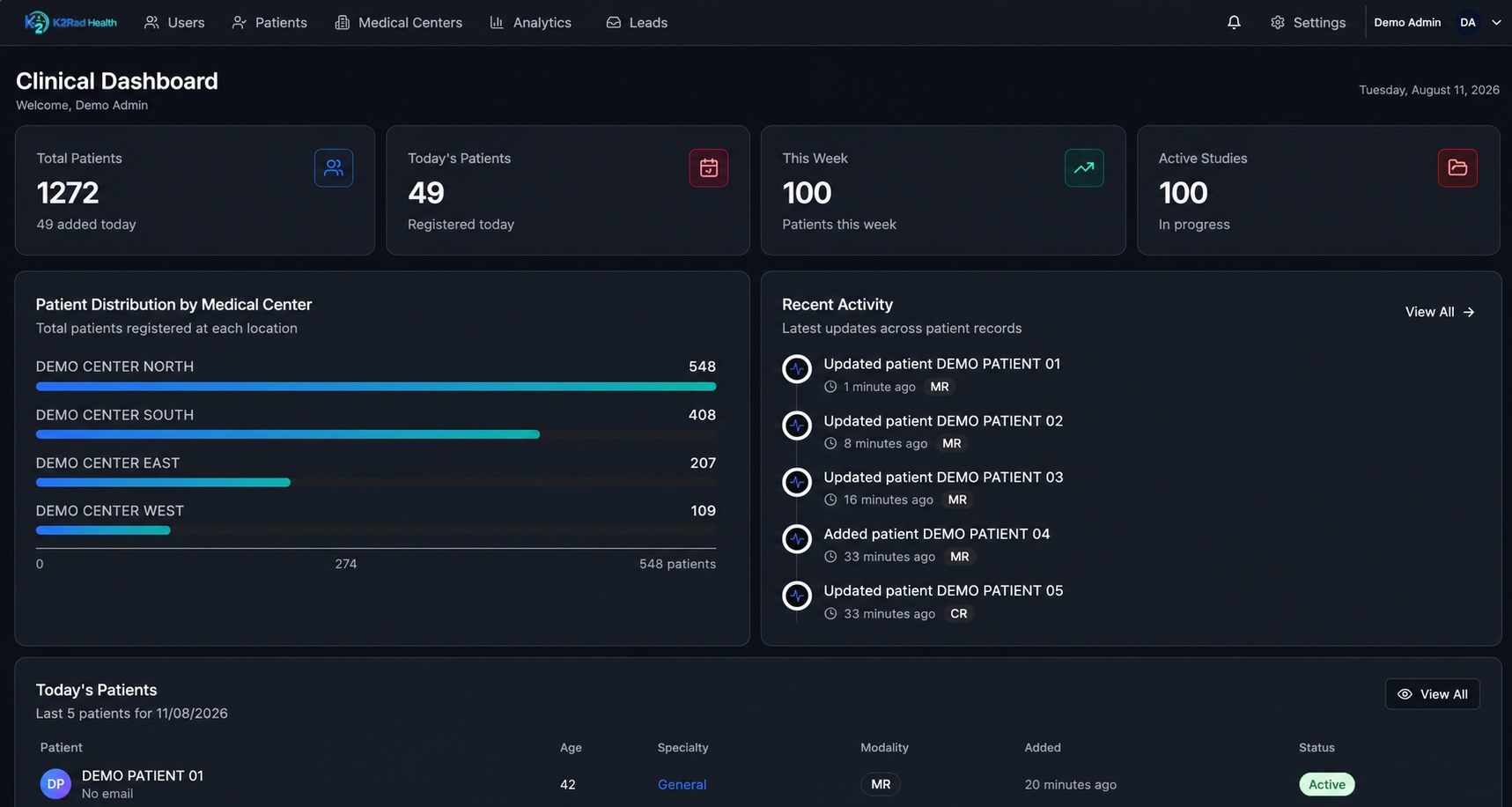
From modality to report
Give diagnostic-center teams and radiologists a clear path from incoming study to finalized report.
Connected access for imaging teams
K2Rad is a teleradiology platform for coordinating imaging and reporting workflows; it does not present itself as a radiologist interpretation service.
Authorized radiologists can access assigned studies, review DICOM images, manage worklists and complete reporting workflows through a browser-based application. Diagnostic centers retain a centralized view of study status, assignments and reporting activity across locations.
Explore the remote radiology workflow →Centralized imaging operations
K2Rad brings DICOM study receiving, browser access, radiologist worklists, reporting, sharing and authorized exports into one cloud PACS workflow.
Receive imaging studies from supported modality and workstation workflows through the K2Rad Gateway.
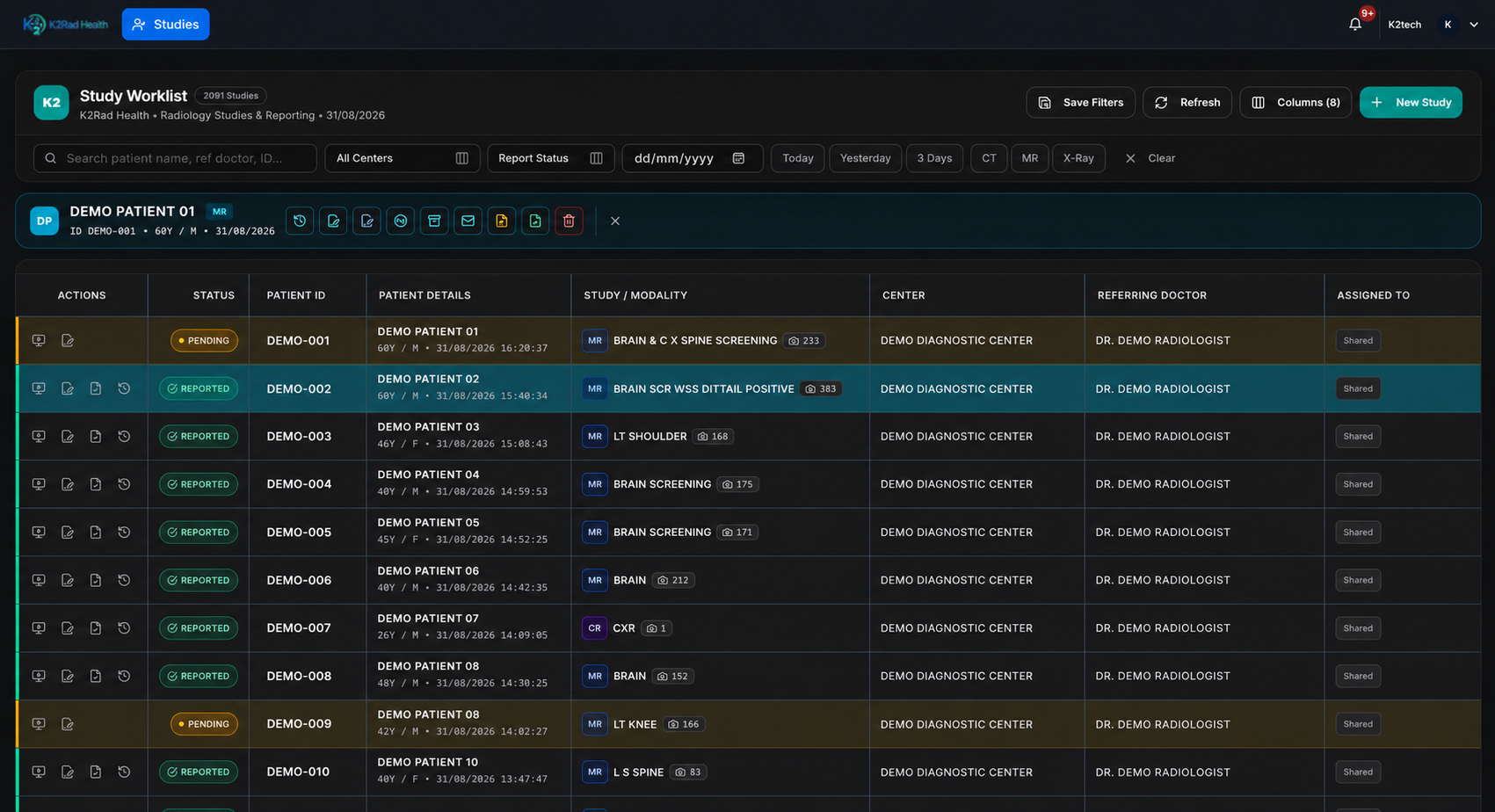
Organize incoming studies, assignment and reporting activity through a centralized worklist.
Review imaging studies directly within the authorized reporting workflow.
Create, edit, review and finalize radiology reports while maintaining study context.
Connect multiple diagnostic centers with multiple reporting doctors through one platform.
Platform in practice
The zero-footprint web DICOM viewer keeps authorized imaging review in context with the study worklist, report workspace and patient information.
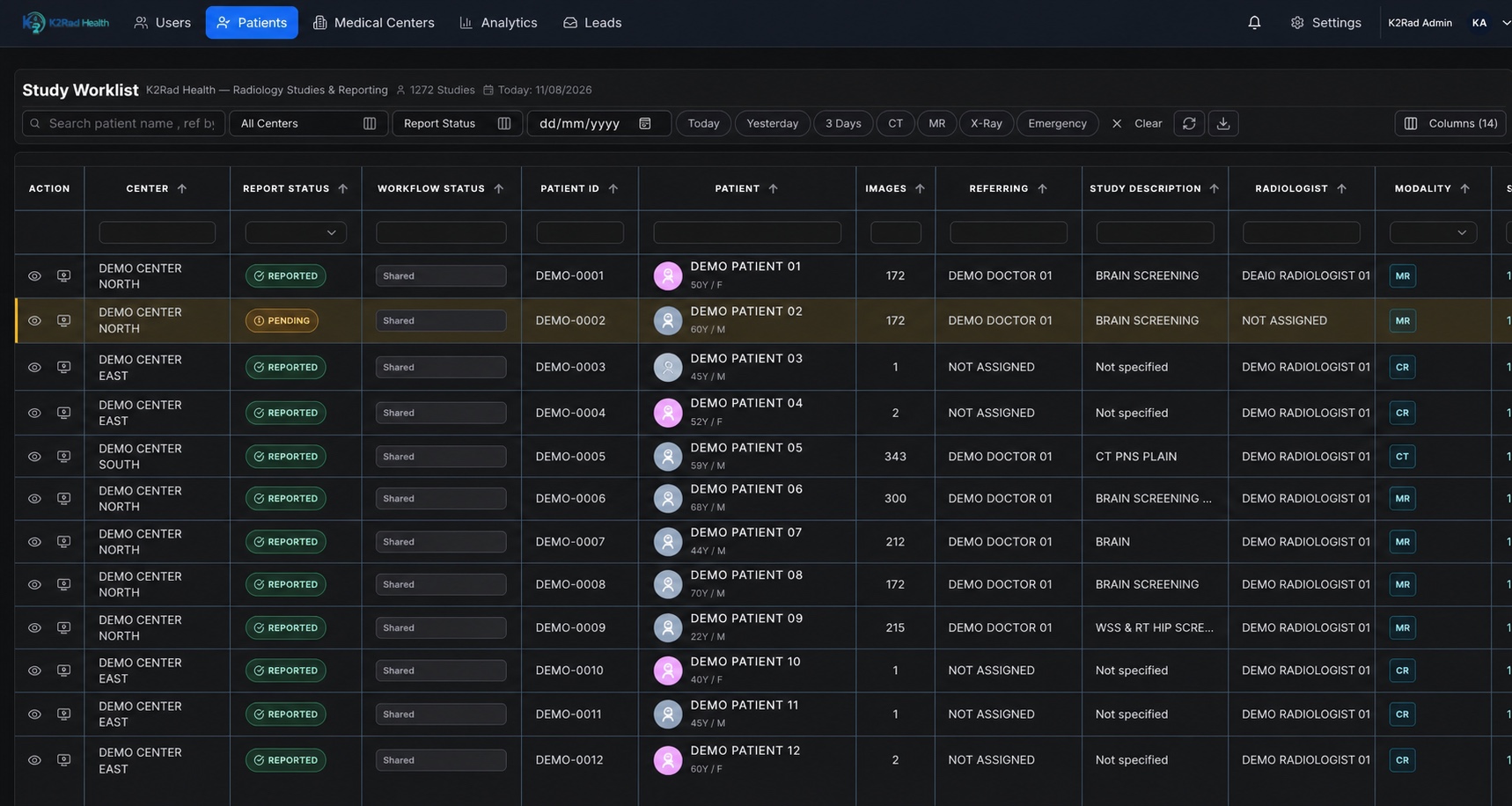
Filter by facility, report status and modality while tracking patient studies and radiologist assignments.
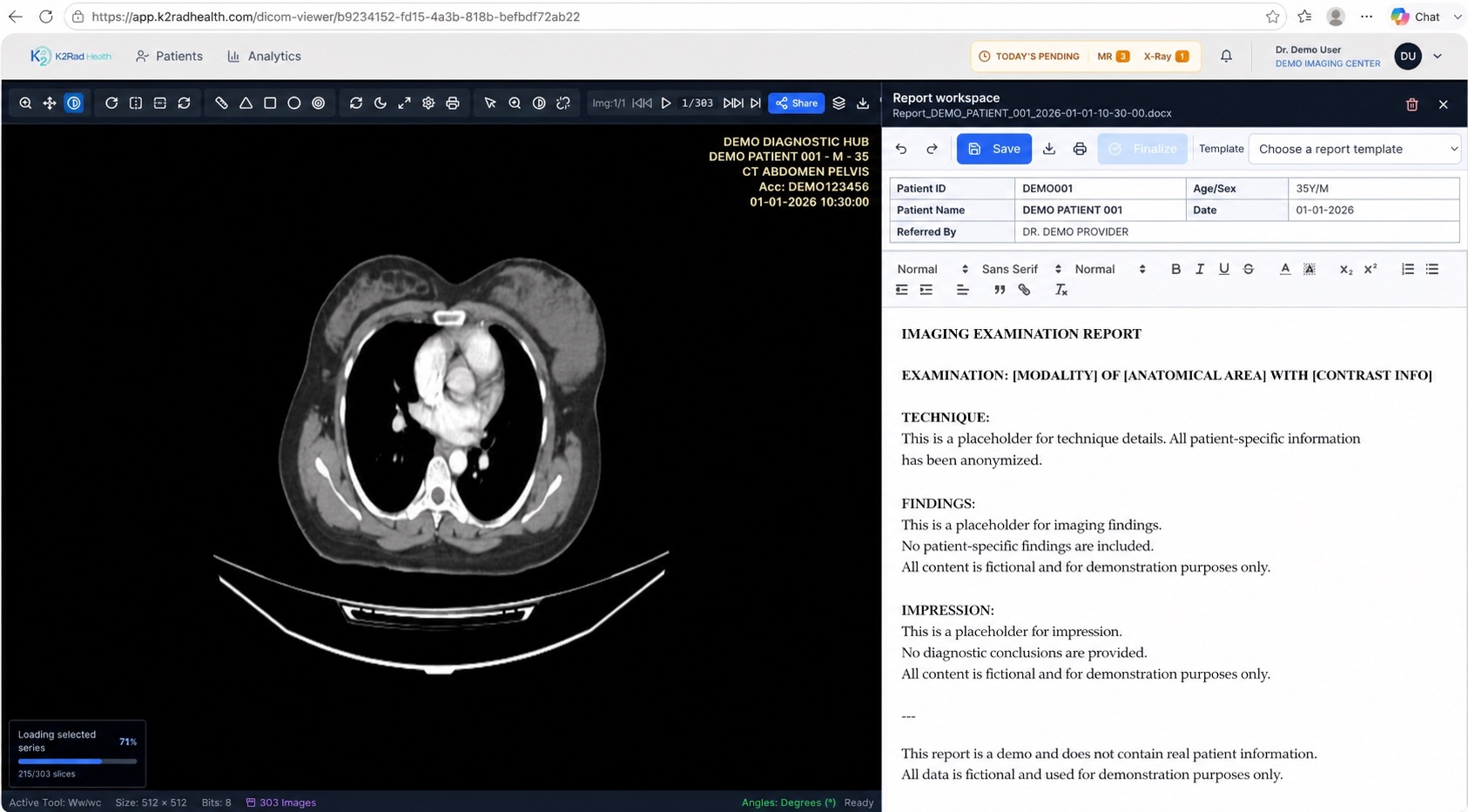
Review DICOM images beside the report editor while keeping study context available.
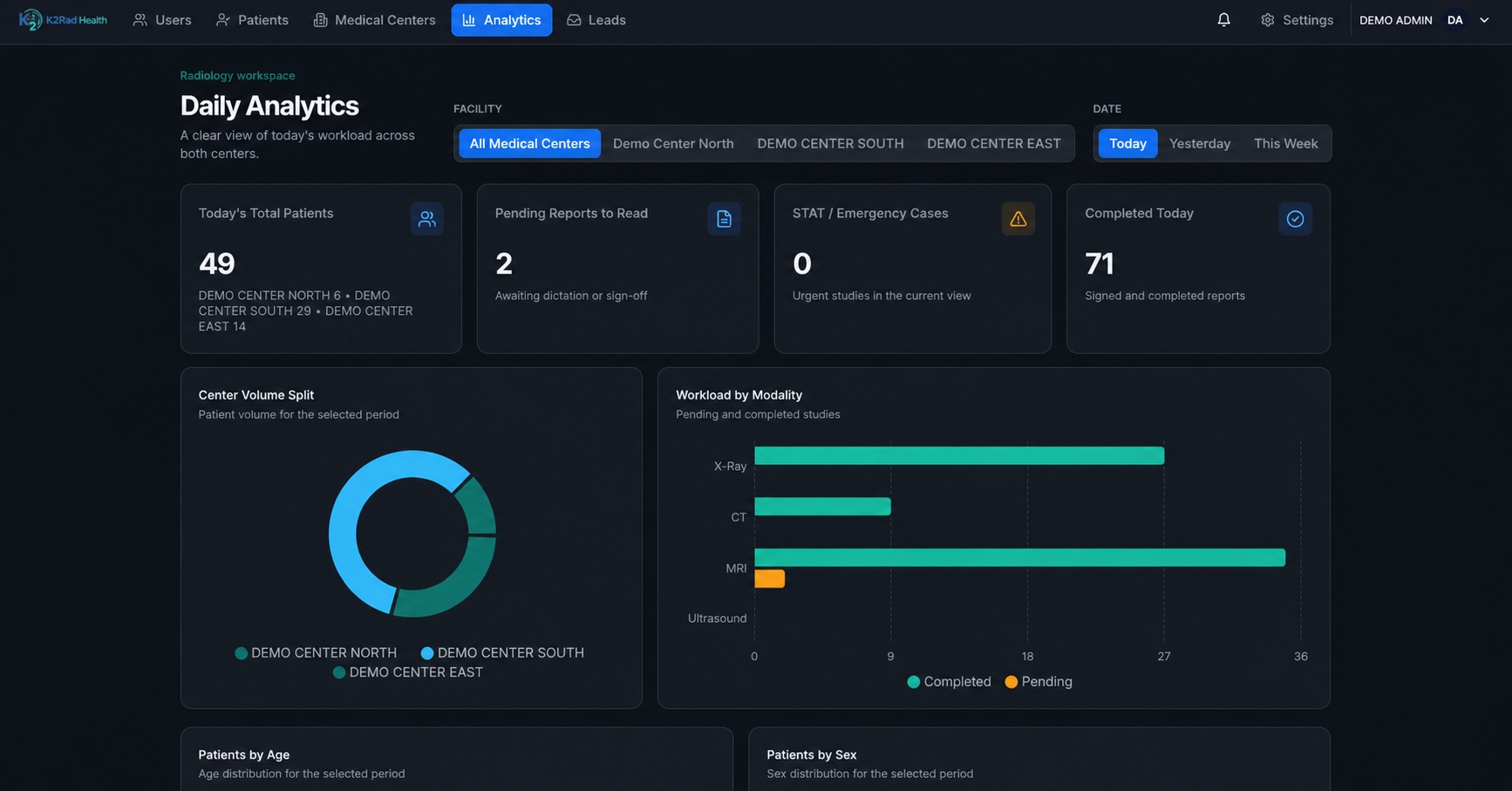
Review center volume, emergency activity and workload distribution by modality.
Designed for supported DICOM-producing modality and workstation workflows.
Authorized users access viewing and reporting workflows through a modern web browser.
Role-based access and time-limited sharing support controlled clinical collaboration.
Create, review and finalize
K2Rad keeps report creation, editing, doctor review and finalization connected to the relevant study, DICOM viewer and radiologist worklist.
Review available patient and study activity information when audit access is enabled for an authorized account.
Create a time-limited, read-only DICOM study link for an intended referring doctor without providing access to the full clinical application.
Export an authorized study when imaging files need to move through an approved clinical workflow.
See when another authorized user is already working on a study, helping teams avoid overlapping work and unclear handoffs.
Doctors and technicians receive separate workflow actions based on their responsibilities, permissions and center setup.
Technicians can manage report content in a familiar editor with practical document-formatting controls for smoother report preparation.
Configurable session limits support approved parallel workflows so authorized center staff can manage incoming studies efficiently.
Move reports through editing, doctor review and finalization while maintaining clear study status across the worklist.
Operational analytics
Use visual summaries to review workload and reporting patterns without manually combining information from separate systems.
For imaging organizations
Connect cloud PACS, study worklists, DICOM viewing and radiology reporting without relying on fragmented manual processes.
Remote radiology reporting
Authorized radiologists can access assigned studies, DICOM imaging and reporting workflows through a browser-based application, helping diagnostic centers coordinate remote reporting across locations.
See the platform
Explore K2Rad product views across study management, mobile viewing, reporting, external DICOM review, secure delivery and operational analytics.
Clear platform answers
Understand how K2Rad connects PACS, DICOM viewing, worklists and radiology reporting for diagnostic centers and authorized radiologists.
Discuss your radiology workflow →K2Rad Health is a cloud-based radiology workflow platform for diagnostic centers, radiologists and imaging organizations. It combines DICOM study receiving, a browser-based DICOM viewer, centralized worklists, radiology reporting, multi-center workflow management, study sharing, authorized exports and operational analytics. K2Rad is software for coordinating radiology workflows; the website does not present K2Rad as a radiologist interpretation service. Explore the platform capabilities.
Cloud PACS is a cloud-based picture archiving and communication system used to manage medical imaging studies through connected digital workflows. In K2Rad, cloud PACS capabilities connect DICOM study receiving with authorized browser access, radiologist worklists, reporting, sharing and exports. This keeps imaging and workflow context together for diagnostic centers and reporting teams. See K2Rad’s cloud PACS workflow.
Teleradiology is the electronic transfer and remote access of radiology studies so authorized radiologists can review imaging and participate in reporting workflows away from the imaging location. K2Rad supports the software workflow behind teleradiology by connecting DICOM images, assignments, worklists and reporting in a browser-based platform. It does not claim to supply radiologist interpretation services. Learn about K2Rad teleradiology workflows.
K2Rad gives authorized users a centralized radiology worklist with access to assigned studies, DICOM images and reporting tools. Diagnostic centers can coordinate study status and assignments across locations, while radiologists can review imaging and complete supported reporting steps through the web application. Explore remote radiology reporting workflows.
Yes. K2Rad includes an integrated, zero-footprint web DICOM viewer within the authorized clinical workflow. Radiologists can review supported DICOM studies while maintaining study and reporting context in the same browser-based application. Viewer access remains subject to the user’s role and permissions. Explore the integrated DICOM viewer.
Authorized radiologists can access assigned worklists, supported DICOM studies and reporting workflows through K2Rad’s browser-based application. This remote access helps diagnostic centers coordinate radiology reporting across locations without suggesting that K2Rad itself performs medical interpretations. Access depends on the organization’s configured users, roles and permissions. See the radiologist workflow.
Yes. K2Rad supports report creation, editing, doctor review and finalization while maintaining the associated study context. Its reporting workspace connects with the radiology worklist and DICOM viewer so authorized teams can manage supported reporting steps within one application. Review online radiology reporting capabilities.
K2Rad is designed to connect multiple diagnostic centers with reporting radiologists through centralized worklists and center-aware workflows. Authorized teams can view relevant study status, assignments and operational analytics based on their configured access. See radiology solutions for diagnostic centers.
K2Rad organizes incoming studies, assignments, report status and workflow activity in a centralized radiology worklist. Users can filter supported views by information such as facility, modality and reporting status, while role-specific actions help doctors, technicians and administrators focus on their responsibilities. Review the connected workflow.
PACS manages medical imaging studies and related access workflows. Teleradiology describes remote access to radiology studies for review and reporting coordination. K2Rad connects these concepts: its cloud PACS capabilities organize DICOM studies, while browser-based worklists, viewing and reporting support remote radiology workflows for authorized users.
Yes. K2Rad supports center-aware study management, radiologist assignments, worklists, reporting and analytics across multiple diagnostic-center locations. The platform is intended to give authorized teams a connected operational view while preserving role-specific access and workflow actions. Explore multi-center radiology workflow.
Use the K2Rad demo request form to share your organization and contact details, number of centers if relevant, and a short description of your workflow. Do not submit patient or medical information. The K2Rad team will use the request to discuss how the platform may fit your diagnostic-center or reporting workflow. Request a K2Rad demo.
Request a demonstration
Tell us about your diagnostic center or reporting team. We’ll help you understand how K2Rad can fit your workflow.
